Getting installed fullscreen PWAs to actually reach into the notch
Status: 🎉 Landed
Update 15.7.2026: ✅ The final CL of the stack landed - fullscreen PWAs going edge-to-edge is now available in Chrome Canary for Android behind chrome://flags/#web-app-short-edges-cutout-mode.
The Problem
Install a PWA that asks for the whole screen and it still does not get the whole screen.
The canonical repro is the interop viewport demo. It is a PWA with:
viewport-fit=coverin the viewport meta tagdisplay: fullscreenin the web app manifest
Install it, launch it, and on Android it stops short of the status-bar / camera-notch region instead of drawing under it. A regular web page that calls document.documentElement.requestFullscreen() goes truly edge-to-edge, but the installed PWA does not.
This had been reported by authors repeatedly - the expectation is simple: a fullscreen PWA with viewport-fit=cover should cover the cutout area just like native fullscreen does.
Bug: 407420295
The Investigation
Android exposes LAYOUT_IN_DISPLAY_CUTOUT_MODE_SHORT_EDGES to let a window lay out into the display cutout on the short edges of the screen. Native fullscreen paths use it; the web app / activity flow did not opt in, so the PWA window was laid out with the default cutout mode and stayed below the notch.
Getting from "default" to "short edges" was not a one-line change. The edge-to-edge state on Android is plumbed through several layers - an edge-to-edge manager, a display cutout controller, and the token bookkeeping that decides when the decor fits system windows. The cutout mode had to be threaded through all of them, gated behind a flag, without disturbing the existing edge-to-edge behavior that other surfaces rely on.
The Fix
The change landed as a stack so each layer could be reviewed and de-risked on its own:
- MERGED Android: refactor edge-to-edge manager plumbing
- MERGED Hide top-toolbar hairline when content offset includes it
- MERGED Android: add WebApp short-edges cutout mode flag
- MERGED Android: add short-edges plumbing to display cutout controller (relanded, see below)
- MERGED Android: enable short-edges cutout mode in webapp and activity flows
- IN REVIEW Android: rename releaseSetDecorFitsSystemWindowToken callers to releaseEdgeToEdgeToken
The controller-side CL adds support for LAYOUT_IN_DISPLAY_CUTOUT_MODE_SHORT_EDGES behind a delegate bit that defaults to false - a no-op on its own. The webapp/activity-flow CL is the one that actually flips fullscreen PWAs into short-edges mode. The rename CL is mechanical cleanup, moving callers off the deprecated releaseSetDecorFitsSystemWindowToken shim to the canonical releaseEdgeToEdgeToken.
The Reland Saga
The controller-side plumbing CL earned itself a small reland history. The code was fine; the tests were the problem. Android form factors are messier than they look:
- Original (7864522): landed, then got reverted because the new
WebappDisplayCutoutTeststandalone tests timed out on desktop-freeform bots. A standalone webapp there runs in a windowed, non-fullscreen container, soSHORT_EDGESnever applies and the test waits forever for a cutout mode that will never arrive. - Reland 1 (7944188): skipped the tests on
DeviceFormFactor.DESKTOP_FREEFORM. Still not enough - tablets and non-freeform desktop hit the same windowed-container behavior but are a different form factor value. - Reland 2 (7968718): widened the skip to
DeviceFormFactor.TABLET_OR_DESKTOP. Standalone webapps with cutout treatment are only exercised on phones anyway; the fullscreen webapp test still covers the cutout path on the larger form factors. This one stuck.
After the inset plumbing landed, the final CL enabled the behavior for webapp and activity flows.
Trying It in Canary
On Chrome Canary for Android:
- Open
chrome://flags/#web-app-short-edges-cutout-modeand enable it - Install a PWA with
display: fullscreen(ordisplay_override: ["cover-display-cutout"]) andviewport-fit=cover- e.g. one of the sampler demos - Launch it from the home screen - it now draws into the notch, with
env(safe-area-inset-top)reporting the cutout height
Before and After
Captured on-device from the APK sampler. Unpatched stops below the cutout, patched draws under it.
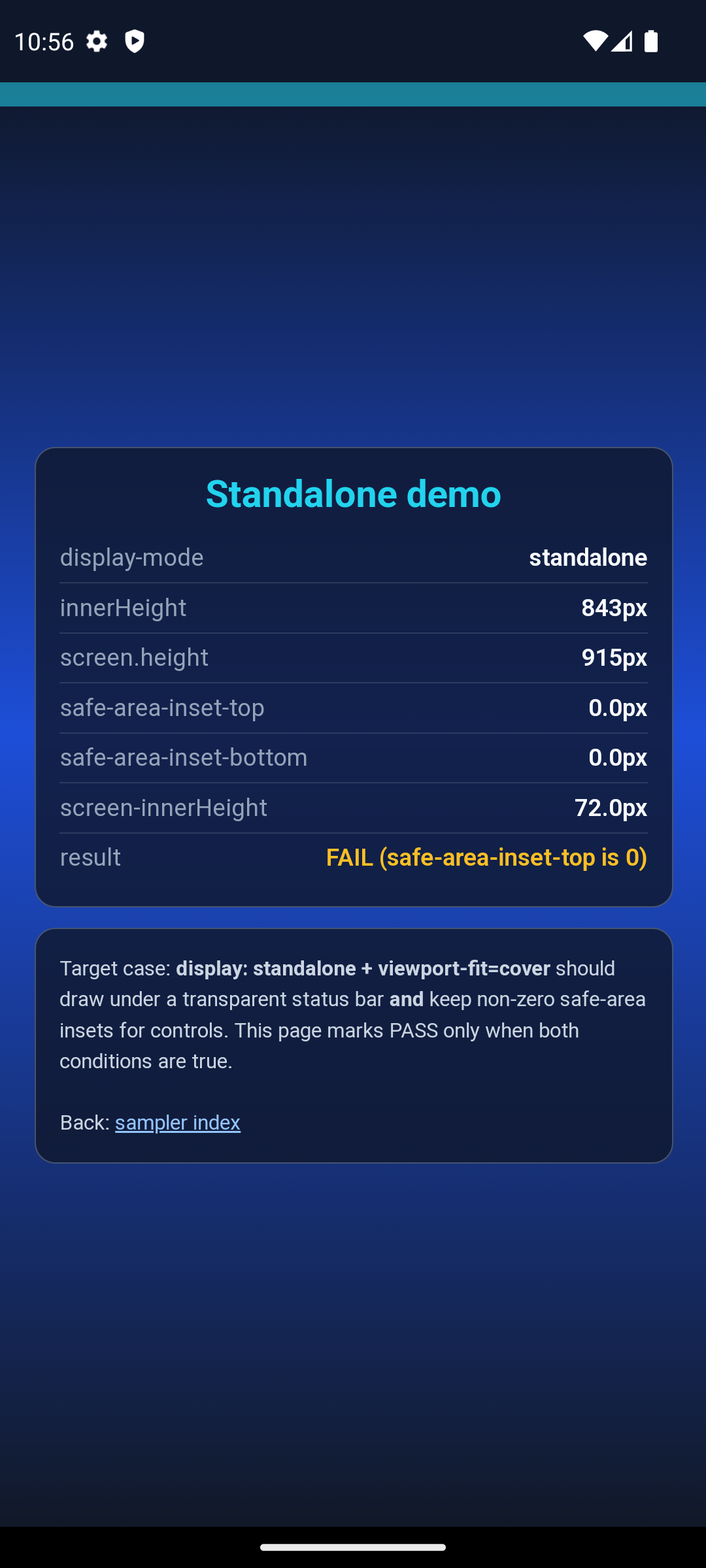
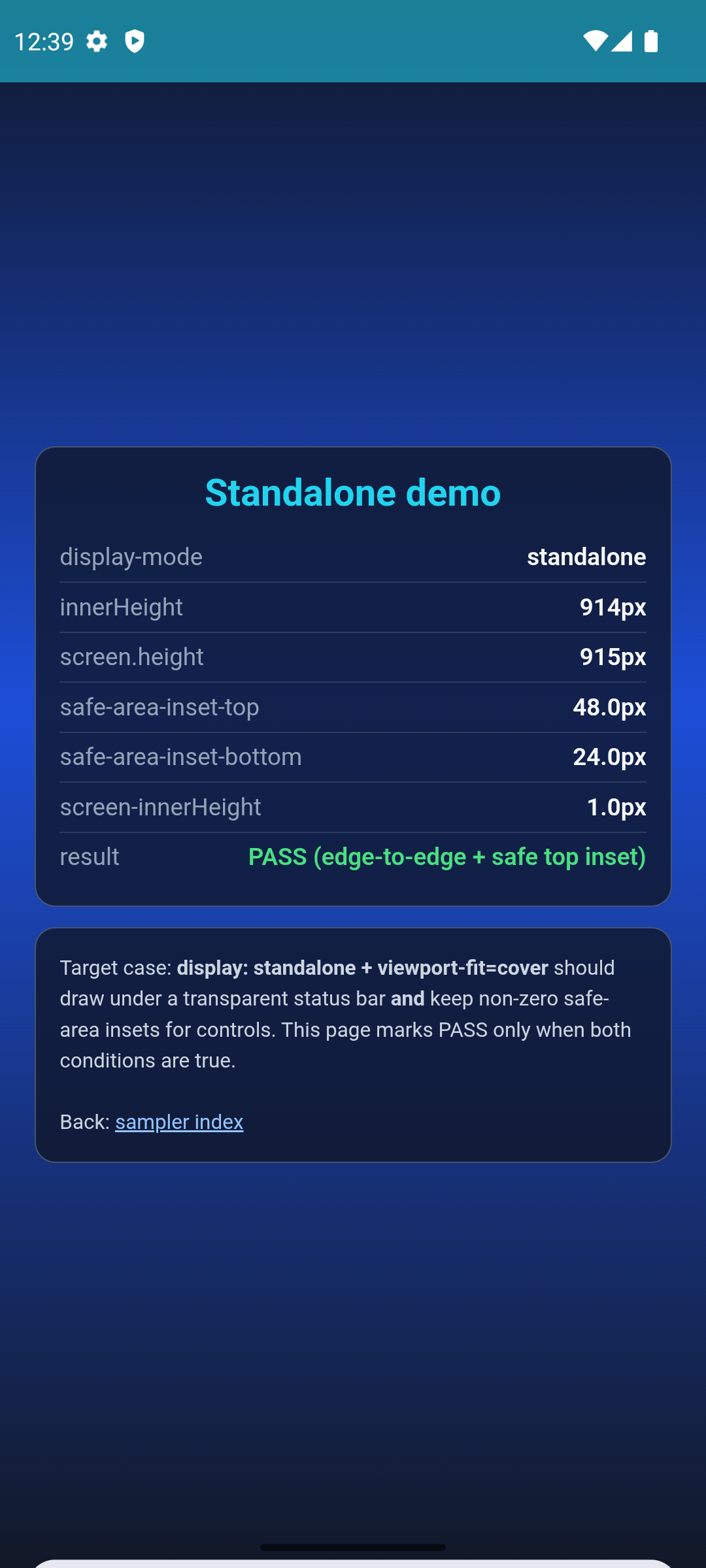
The demo page self-reports its verdict: it reads display-mode, innerHeight vs screen.height, and env(safe-area-inset-top) and prints PASS (edge-to-edge active) only when the window really extends under the cutout. In the "after" shot, safe-area-inset-top reports the actual 48px cutout height instead of 0.
The sampler covers the other flows too (fullscreen display mode, backswipe, and the requestFullscreen() control case that already worked), plus a no-notch gallery proving the change is a no-op on devices without a cutout, and downloadable APKs for each case.
Thanks
Big thanks to reviewers Dan Murphy and Charles Hager for the patient back-and-forth across the stack - the layered, flag-gated approach is a direct result of their guidance on keeping a shared Android codepath safe.